Think of context as the fuel that makes AI run at full speed—or the building blocks that determine what it can actually construct for you.
Without context, AI is just giving you generic answers. With the right context? It becomes an extension of your brain, making decisions that are smarter, more nuanced, and perfectly tailored to your world.
That's why intentionally accumulating your information—your notes, your workflows, your ideas—in a way that AI can easily access is one of the most valuable habits you can build.
It doesn't matter where you keep it. For me, it's Notion because I found notion ai and database works the best for me. For you, it could be Obsidian, Google Docs, or even a plain text editor. The platform isn't what matters—what matters is that everything lives in one place, organized and accessible.
When you gather all your information together, AI stops being a one-off tool and starts being a real collaborator.
Here's how I set mine up#
I built a central home base in Notion that connects everything I'm working on. The key is creating a single source of truth that AI can reference whenever I need help—whether I'm debugging code, writing reports, or planning my week.
Here's the structure:
1. A central hub page#
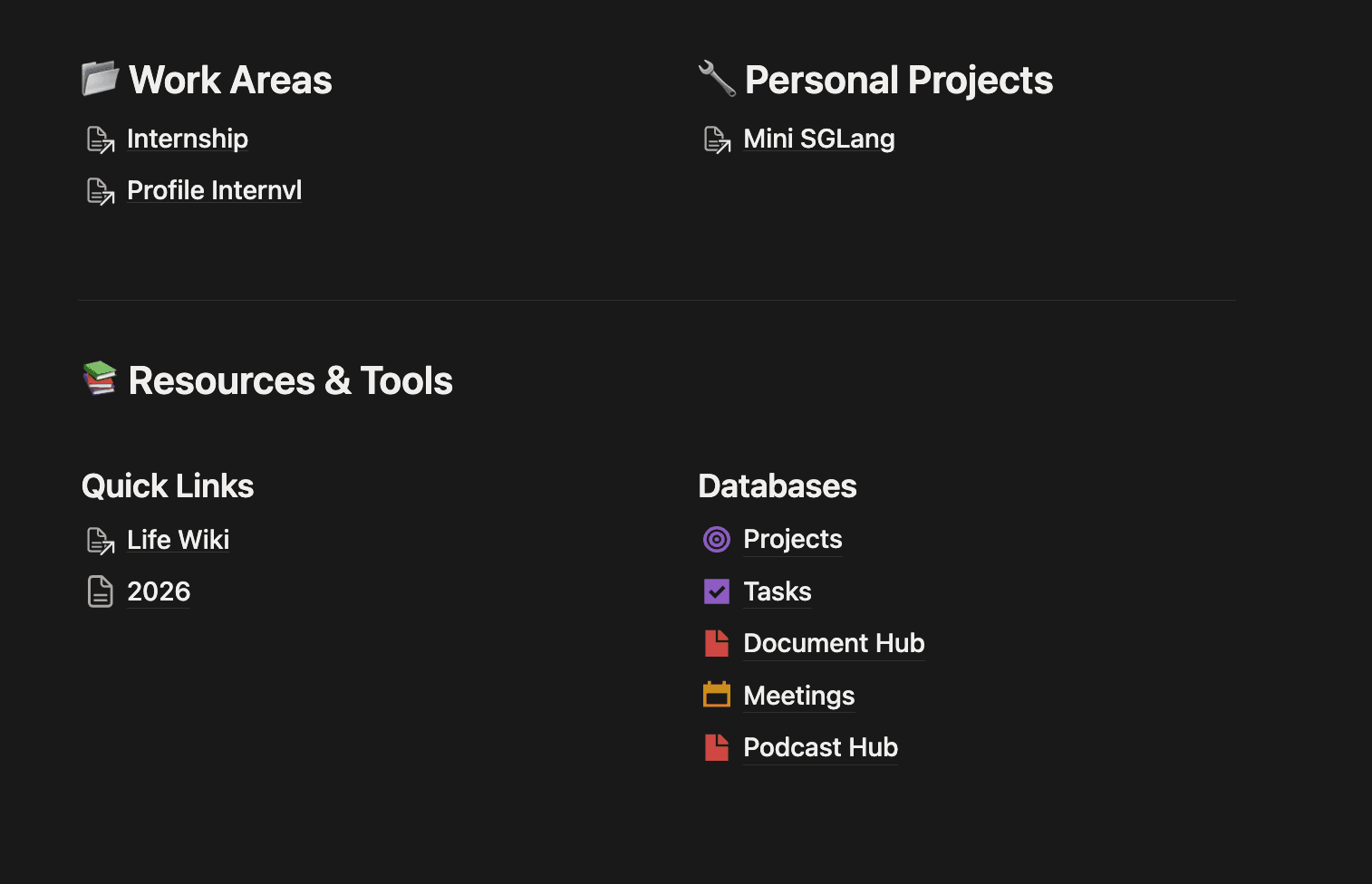
I created a Home page that acts as my mission control. It's the first place I go every morning, and it's where AI can quickly understand what I'm working on.
The hub is organized into three sections:
Work Areas — Active projects that need deep focus:
- My internship work
- Current technical projects with detailed documentation
Personal Projects — Side projects and learning experiments
Resources & Tools — Databases and references I use daily:
- Life Wiki for personal organization
- Year-based planning (2026 folder for weekly plans)
- Five databases: Projects, Tasks, Document Hub, Meetings, Podcast Hub
I design this space to be as simple as possible to minimize entropy. Each page is isolated—I dive into individual pages for details.
2. Structured databases for different information types#
Instead of scattering information across random pages, I use dedicated databases:
Projects — High-level initiatives with goals, timelines, and context
Tasks — Granular action items linked to projects
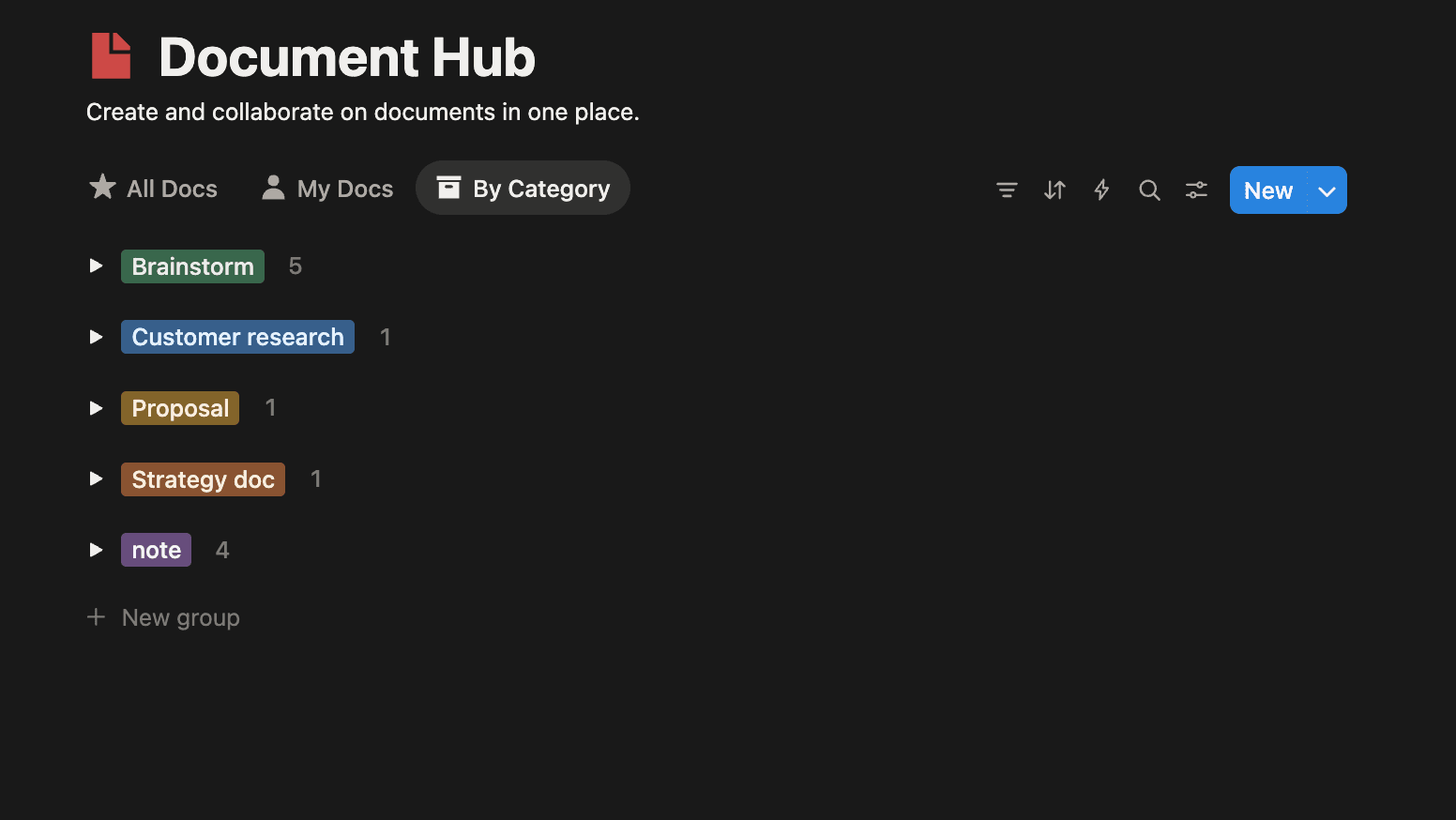
Document Hub — Notes, guides, and reference materials (like this one). I put all my document in one database and categorize them by topic, so as tasks and projects
Meetings — Meeting notes with summaries and action items
Podcast Hub — Ideas and insights from podcasts I listen to
Each database has consistent properties (status, dates, tags) so AI can query and filter information intelligently.
3. Deep documentation for complex work#
For my internship project profiling InternVL, I created a nested page structure:
- Project hub — Overview and current status
- Implementation plans — Step-by-step technical approach
- Experiment guides — How to run controlled tests
- Results & reports — Findings and analysis
- Archive — Historical context and past attempts
This structure lets me (and AI) quickly navigate from high-level context to implementation details without losing the thread.
4. Linking everything together#
The magic happens when you connect the dots:
- Tasks link to Projects
- Meeting notes reference relevant documents
- Weekly plans link to active tasks
- Project pages link to related technical guides
When AI can traverse these connections, it understands not just what you're working on, but why and how it all fits together.
Use Cases: What You Can Do With Context#
Work & Projects#
- "Write a status update for my mentor" — Knows your experiments, results, and progress
- "Help me plan next week" — Sees current projects, deadlines, and priorities
- "What should I focus on today?" — Prioritizes based on goals and constraints
Technical Problem Solving#
- "Debug this profiling issue" — Has context on your codebase and past solutions
- "How did I solve [similar problem] last time?" — Searches your implementation history
- "Explain this error in my setup" — Knows your environment and configuration
Writing & Communication#
- "Draft an email to [person] about [topic]" — Understands relationship and communication style
- "Turn these meeting notes into action items" — Knows your project structure and task format
- "Write a blog post about [technical topic]" — Has your technical details and learnings
Knowledge & Learning#
- "What have I learned about [topic]?" — Aggregates insights across your notes
- "Find that note about [vague topic]" — Semantic search when you don't remember exact terms
- "Compare [approach A] vs [approach B]" — References your past projects and outcomes
Claude Code: Use Skill Building Reusable Workflows#
When Claude Code has access to your codebase, documentation, and past implementations, you can create customized markdown Skill files for frequent tasks. These become reusable Skills that encode your specific patterns and context.
These MD files act as executable checklists that Claude Code can follow while accessing your actual codebase and documentation. You're not just writing instructions—you're creating context-aware automation that adapts to your specific project.
Notion: Building the Same Workflow Templates#
You can build the exact same reusable templates in Notion. Instead of .md files, create template pages in your workspace that Notion AI can reference and execute.
How to set it up:
- Create a "Workflows" or "Prompts" database to store your templates
- Each page is a workflow template with:
- Clear step-by-step instructions
- Links to relevant pages in your workspace (using
@mentions) - Context about where to find patterns, standards, or reference implementations
Example Notion template pages I am using:
Write Status Update — Weekly reporting template
- Pull progress from
@Project Hub - Check completed tasks in
@Tasksdatabase - Reference experiment results from
@Results & Reports - Format following
@Status Update Template - Include blockers and next steps
Plan Week — Weekly planning routine
- Review active projects from
@Projectsdatabase - Check upcoming deadlines in
@Tasks - Reference priorities from
@Current Goals - Block time for deep work on
@Top Priority Project - Schedule meetings from
@Meeting Notesaction items
Write Technical Blog Post — Content creation workflow
- Pull technical details from
@Implementation Plans - Reference learnings from
@Experiment Results - Check past posts in
@Document Hubfor style - Include code examples from
@Code Snippets - Add visuals from
@Screenshots & Diagrams
How to use them:
When you need to execute a workflow, just tell Notion AI:
"Follow my 'Write Status Update' template for this week"
Notion AI will:
- Navigate to that template page
- Follow the steps while accessing your linked pages
- Pull information from your databases
- Generate output that matches your patterns
Start simple#
You don't need to build this overnight. Start with:
- One central hub page — Your home base
- Two databases — Projects and Tasks to start
- Document your current work — Even just bullet points
As you accumulate context, AI gets smarter. And as AI gets smarter, you move faster.
That's the compounding effect of building your personal knowledge base.