Most RAG tutorials optimize for enterprise scale: huge corpora, distributed infrastructure, and complex orchestration. My use case was different.
I wanted a chatbot on edwingao.com that could answer questions about my writing and projects, cite sources, stream responses, and stay cheap enough to run continuously.
This article explains the architecture, tradeoffs, implementation details, and production hardening work that made it reliable.
Goals And Constraints#
I set explicit constraints before writing code:
| Constraint | Why it mattered |
|---|---|
| Cost under about $1/month | Personal project should be sustainable |
| No manual indexing steps | Publishing content should auto-refresh retrieval |
| Source-grounded answers with citations | Avoid hallucinated claims about my work |
| Good UX on desktop and mobile | Chat should feel native, not bolted on |
| Clear failure behavior | Invalid input should return 400, infra failures degrade gracefully |
High-Level Architecture#
The system has two pipelines:
- Build-time indexing
- Runtime retrieval and generation
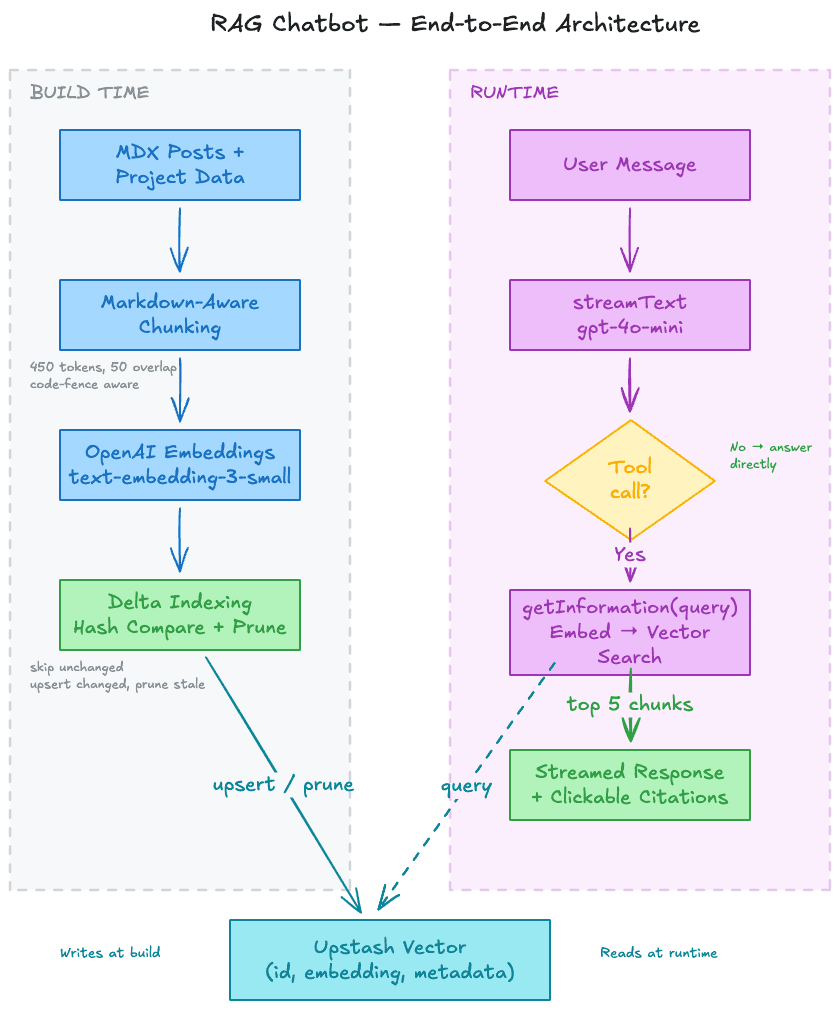
Stack: Next.js App Router, Vercel AI SDK, OpenAI (text-embedding-3-small, gpt-4o-mini), Upstash Vector.
Why I Use Markdown + Diagrams For Visual Experience#
I wanted this system to be understandable in under a few minutes, especially for readers scanning quickly (including recruiters). So I intentionally structured the post with Markdown primitives and diagram callouts.
What I optimized for:
- Fast scanning: short sections, numbered headings, concise bullet lists.
- Decision visibility: tables for constraints and architectural choices.
- Concrete credibility: code blocks for implementation details, not just high-level claims.
- Mental model first: architecture and sequence diagrams placed before deep implementation sections.
Markdown made this easy to maintain in the same content pipeline as the rest of the site, and diagrams reduced cognitive load for non-specialist readers.
Design Decisions#
| Decision | Choice | Reason |
|---|---|---|
| Retrieval strategy | Vector search + threshold filter | Better semantic match than lexical overlap |
| Invocation strategy | LLM tool calling | Model decides when retrieval is needed |
| Indexing schedule | Build-time script | Predictable, cheap, no runtime indexing cost |
| Chunking | Markdown-aware + token-aware + overlap | Better recall across section boundaries |
| Citation mapping | Stable per-request source map | Deterministic [1], [2] references |
| Cost control | Delta indexing by contentHash | Avoid re-embedding unchanged chunks |
1) Chunking: Retrieval Quality Starts Here#
Chunking is usually the highest leverage part of a small RAG system. If chunk boundaries are poor, retrieval quality drops no matter how good the model is.
My chunker is:
- Markdown-aware (splits on H1-H3 boundaries)
- Token-aware (
js-tiktoken, GPT tokenizer) - Overlap-aware (50-token overlap between adjacent chunks)
- Code-fence-aware (never splits inside fenced code blocks)
const TARGET_CHUNK_TOKENS = 450;
const MAX_CHUNK_TOKENS = 1000;
const OVERLAP_TOKENS = 50;
I also generate deterministic chunk IDs (post:{slug}:{index}), so re-indexing can compare stable IDs and hashes.
A subtle bug worth calling out#
I hit an overlap bug where boundary text could merge words (...startsNEXT) when prepending overlap. That degraded embedding quality at chunk boundaries.
Fix: insert a separator when needed if overlap suffix and next chunk prefix do not already contain whitespace.
2) Embeddings + Retrieval: Keep It Simple, Deterministic, Cheap#
I use text-embedding-3-small for both indexing and query embeddings.
Reasons:
- Strong enough quality for a small corpus
- Very low cost
- Consistent dimensions and behavior across indexing/runtime
Retrieval flow:
- Embed query
- Query top-K vectors (
topK=10) - Filter by
RAG_MIN_SCORE(default0.3) - Return top 5 chunks for the LLM
const results = await index.query({
  vector: queryEmbedding,
  topK: 10,
  includeMetadata: true,
  includeData: true,
});

const filtered = results.filter(
  (r) => typeof r.score === "number" && r.score >= minScore,
);

return filtered.slice(0, 5);
The retrieval module returns structured statuses (ok, no_results, unavailable) so the chat route can degrade cleanly.
3) Delta Indexing: Production Behavior On A Small Budget#
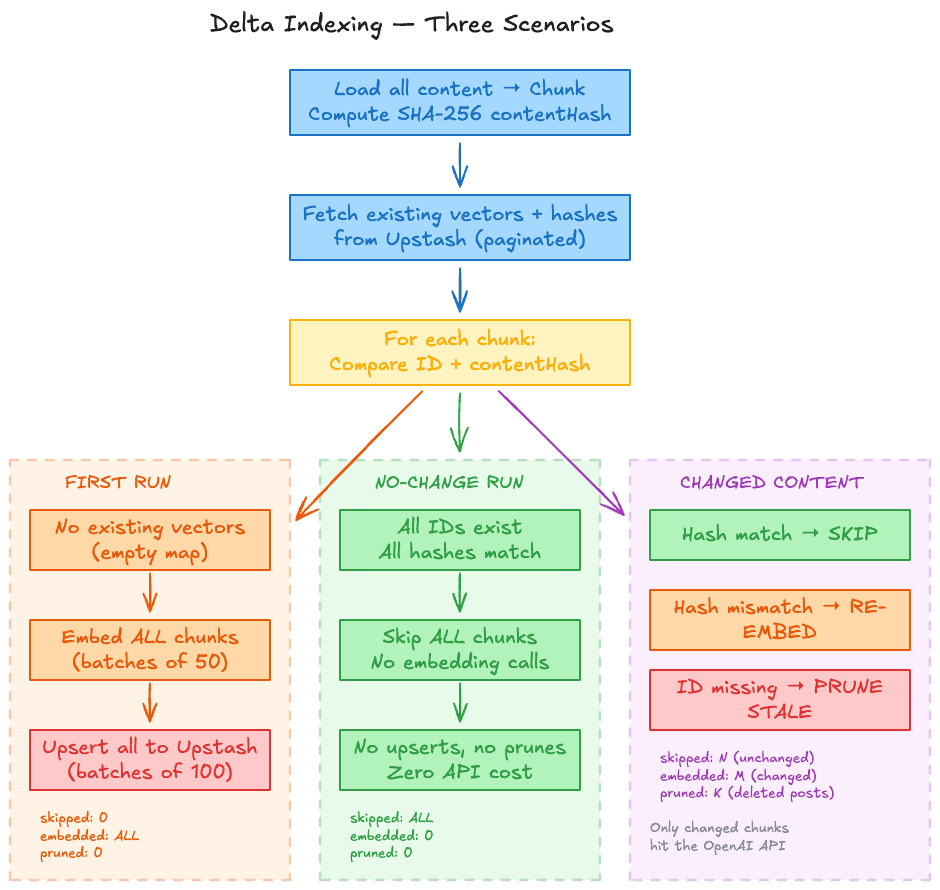
Naive indexing re-embeds everything every run. That is expensive, slow, and unnecessary.
I store a contentHash in vector metadata, then compare current chunks to existing vectors:
- Same ID + same hash -> skip
- Same ID + different hash -> re-embed/upsert
- Missing ID in current set -> prune stale vector
if (existingHash && existingHash === chunk.metadata.contentHash) {
  stats.skipped++;
} else {
  changed.push(chunk);
  stats.embedded++;
}
This changed indexing behavior from "always re-embed" to true incremental indexing.
Automating indexing in the build pipeline#
To avoid manual mistakes, I created a dedicated indexing script and wired it into the build command:
{
  "scripts": {
    "index-content": "tsx scripts/index-content.ts",
    "build": "npm run index-content && next build"
  }
}
This gives me a simple guarantee: every time I run npm run build, content is chunked and indexed before the app is built. So when I add a new article or project, I do not need to remember a separate indexing step.
4) API Route: Tool-Based Retrieval With Guardrails#
The chat endpoint uses streamText and exposes a retrieval tool.
const result = streamText({
  model: openai(process.env.OPENAI_CHAT_MODEL?.trim() || "gpt-4o-mini"),
  system: SYSTEM_PROMPT,
  messages: await convertToModelMessages(messages),
  maxOutputTokens: 1000,
  stopWhen: stepCountIs(5),
  tools: {
    getInformation: tool({ ... }),
  },
});
Why tool calling instead of always-retrieve#
It allows the model to route behavior:
- Off-topic/general question -> answer directly
- Site-specific question -> call retrieval tool
- Follow-up question -> optionally re-query with refined terms
Validation and status semantics#
I hardened request handling with explicit validation error types so invalid client payloads return 400 instead of accidental 500.
Examples:
- Empty or malformed message list ->
400 - Oversized message content ->
400 - Infra/provider failures ->
500
This matters for observability, client behavior, and API correctness.
5) Client Streaming + Citation Rendering#
The UI uses the AI SDK chat stream and extracts citations from tool output metadata (not from raw text tokens).
function extractCitations(parts: UIMessage["parts"]): ChatCitation[] {
  const citationsById = new Map<number, ChatCitation>();
  // parse tool output parts with state === "output-available"
  return Array.from(citationsById.values());
}
Then the message component parses [1], [2] in response text and binds them to source links.
Two production details that matter:
- Stable memoization in
ChatMessagewith a custom comparator that checks citation content, not only citation count. - Safe link routing for internal vs external URLs (
<Link>for internal paths,<a target="_blank" rel="noopener noreferrer">for external links).
Streaming UX: How I approached the user experience#
Streaming quality is not only a backend concern. It is a user-experience concern.
I focused on these interaction details:
- Immediate feedback: responses start streaming token-by-token instead of waiting for the full completion.
- Visible progress: the active assistant message shows a typing indicator while streaming.
- Stable reading flow: previous messages are memoized so only the active message updates during stream.
- Citation timing: citations render after the response stabilizes, which avoids distracting layout jumps mid-stream.
- Input behavior: the send path is guarded while a request is in flight, preventing accidental duplicate submissions.
- Mobile ergonomics: visual viewport handling prevents keyboard and drawer animation conflicts on iOS.
These decisions improved perceived performance and made the chat feel more reliable even before raw latency optimizations.
6) Reliability And Test Strategy#
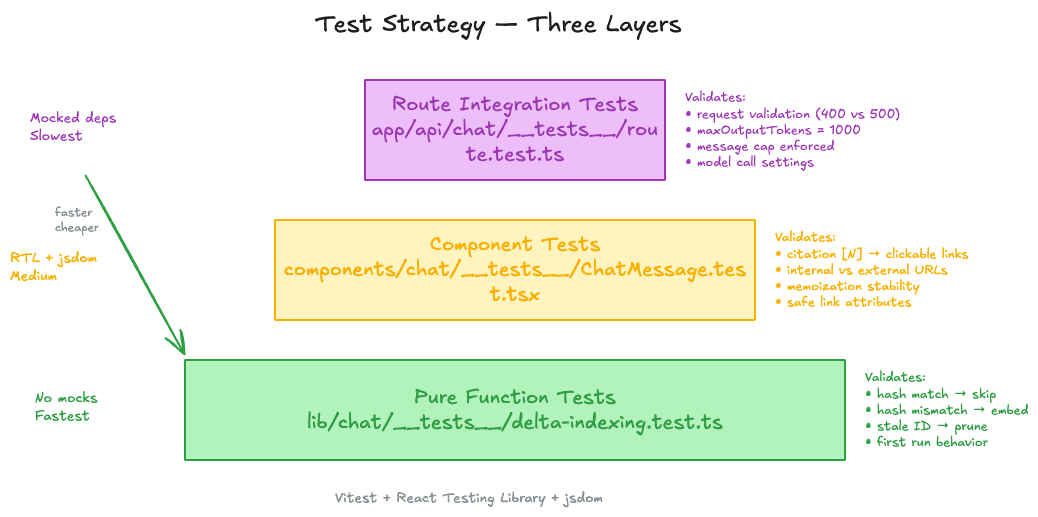
I treat this as an engineering system, not only a demo. I added tests at multiple layers:
- Pure-function tests for delta indexing logic
- Component tests for citation rendering and link behavior
- Route-level tests with mocked dependencies to verify request validation and model call settings
expect(streamTextMock).toHaveBeenCalledWith(
  expect.objectContaining({ maxOutputTokens: 1000 }),
);
That gives confidence the contract stays correct while iterating quickly.
Results#
Cost (estimated at ~1K monthly queries)#
| Service | Cost |
|---|---|
| Embeddings (indexing) | < $0.01 |
| Embeddings (queries) | ~ $0.01 |
| GPT-4o-mini generation | ~ $0.50 - $2.00 |
| Upstash Vector (free tier) | $0 |
| Total | ~$0.50 - $2.00/month |
Runtime#
| Metric | Target | Observed |
|---|---|---|
| Time to first token (warm) | < 1.5s | ~1s |
| Full answer latency | < 8s | ~4-6s |
| No-change re-indexing | < 3s | ~2s |
What I Would Improve Next#
- Add an eval set for retrieval quality (query -> expected source) to catch regressions automatically.
- Run chunk-size experiments (
300,450,600) and measure citation accuracy, not just latency. - Consider a reranker only if corpus size and ambiguity grow enough to justify extra cost/latency.
- Add lightweight request tracing for retrieval status and citation usage in production.
Practical Takeaways#
- Start with chunk quality. Better chunking beats premature model tuning.
- Keep retrieval explicit and observable through tools and structured statuses.
- Use content hashes for build-time indexing economics.
- Treat API semantics (
400vs500) as product behavior, not implementation detail. - Build tests at the right layer: pure logic, component behavior, and route integration.
Why This Project Matters#
This project was intentionally scoped small, but engineered with production discipline:
- Architecture and tradeoff decisions were explicit.
- Reliability bugs were identified and fixed.
- Test coverage was added for core failure modes.
- Cost, latency, and UX constraints were measured and met.
If you are building a similar assistant for a docs site, portfolio, or internal knowledge base, this pattern is a practical baseline that scales from side project constraints to production expectations.